


Address Settings
Access Tech Tips: How to Set Address Switches
Each Access module must have a unique* address in the system. There are two elements to the address: the Group number and the Module ID.
Group numbers are set acording to these basic rules:
- All sources are usually Group 0 (zero) and this number is often hard coded at the factory, with no switch visible on the module.
- AVRs are always Group 4.
- Car amplifiers are Group 4, 5, and 6 for front, rear, and sub, etc.
- Front speakers are Group 4* to match front amps or receivers.
- Other home theater speaker groups such as center, rear, ceiling, sub can be Groups 5, 6, 7, 8 in th order you want them to appear on the 903i (if used).
- Other car speaker groups such as tweeters, rears, full range, and subwoofers can be Groups 5, 6, 7, 8 to match car amplifiers.
Module ID numbers
- The first module in any group is always 0 (zero).
- Number the rest in sequence, not skipping any numbers.
- If you have more than 10 modules in a group, flip the slide switch to the "10-19" position for modules 11-20 (addresses 10-19).
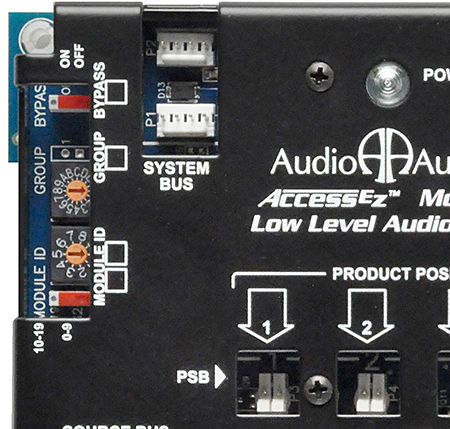
This 922 module has a Group dial that allows it to be a source module (Group 0) or an amplifier module (Group 4) or a Subwoofer Module (Group 5, 6, or 7, etc.).
For example systems, see the appendix in the access manual. Addresses are highlighted in yellow.
- Access Car Audio Manual
 10.56 MiB
- Access Home Audio Manual 5.21 MiB
* Front speakers have the same address as Front amplifiers, or AVRs, but they are still seen as unique switch modules because speaker modules identify themselves differently from all other modules on the system bus. Each speaker module also has either Left or Right as part of its ID.