


![[Image for 1799]](/images/products/1799-angle_scaled_1180.jpg)
Custom Digital Audio Demo Controller
Model 1799Key Features
- Compact controller
- Three ports for remote push-buttons
- Port for volume knob
- One-button, two-button, or three-button modes
- Custom timeout settings
Categories: Soundbars, Speaker Switching, Interactive Switching, Headphone Demo, Modules
![[Top view]](/images/products/1799-top_scaled_100.jpg) Top view
Top view
![[Top view]](/images/products/1799-top_scaled_1180.jpg)
Demo Digital Audio
The Audio Authority® 1799 digital volume controller is a great way to demo products with digital audio. Control digital audio via push-buttons, optional 1794 volume knob, or both. The adjustable timeout feature keeps demos quiet when not in use.
Note: The source device (e.g. the TV) must be in PCM mode. If it is in Dolby Digital mode, the 1799 cannot accept audio signals from it.
Application Examples
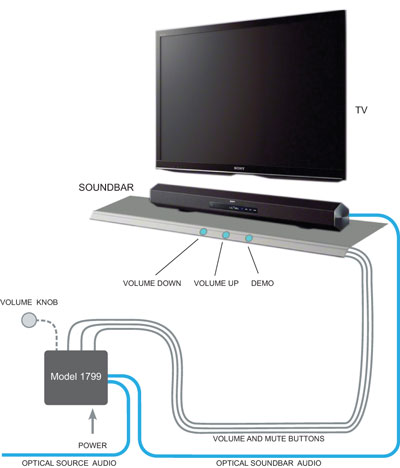
This application shows a soundbar demo. Press the Demo button to activate the sound; the push-buttons display a blinking pattern when the demo is active. Press the volume up or down buttons to control the audio level. Press "Demo" to mute the soundbar, or wait until the 1799 timer mutes the soundbar.
Alternatives:
One-button mode is useful when the volume will be controlled on the soundbar itself. The button mutes or un-mutes the soundbar.
Two-button mode is a simple volume control. The soundbar is silent as the customer aprooaches, until the volume up button is pressed. It returns to silent mode after the timeout period.
Three-button mode is shown. The volume knob can perform the functions of all three buttons - volume up and down, and the push functionality activates the demo.
Downloads
- Literature
- 1799 Focus
 706.02 KiB Custom Digital Audio Demo Controller
- 1799 Focus
- Manuals
- 1799 Manual 375.61 KiB Model 1799 Custom Digital Audio Demo Controller
- 1799 Manual
![[013-100 push-button (rear view)]](/images/products/013-100_rear_rt-angle-inset-1_scaled_100.jpg)
![[PX-100 proximity sensor]](/images/products/PX-100_front2_scaled_100.jpg)
![[GX-100 gesture sensor]](/images/products/GX-100_front-rear1200_scaled_100.jpg)
![[Custom IR Demo Controller]](/images/products/1780-angle1_scaled_100.jpg)
![[Sound bar demonstration system ]](/images/products/1725a-angle_scaled_100.jpg)
![[Volume control (knob sold separately)]](/images/products/1794-black_scaled_100.jpg)